
Is N8n Hard To Learn? A Beginner’s Reality Check
Automating your business isn’t just a tech trend—it’s how solo founders win back hours, cut costs, and scale beyond their own hands. Tools like N8N promise drag-and-drop workflows for everything from marketing to invoices. But is it really beginner-friendly, or will you spend weeks stuck in forums and docs? Let’s get brutally honest about the learning curve, ROI, and what a first-time user should expect.
What Is N8n? (featured Snippet)
N8N is an open-source automation tool that connects apps and services so you can build workflows visually, without writing code. Beginners can automate tasks like email notifications, data syncing, and lead management with simple drag-and-drop steps.
How N8n Actually Works (and Why It Matters)
At its core, N8N lets you link tools like Gmail, Slack, Stripe, and Airtable—no code needed. Think of it as a digital assembly line: you set up triggers (like “new email”), connect actions (like “create Trello card”), and let N8N run the show. This sounds easy, but the actual setup can trip up new users. Here’s why:
- Visual builder: Drag nodes to create workflows.
- Triggers: Start flows based on events (new data, webhook, schedule).
- Actions: The steps N8N takes (send email, update record).
Most solo founders want quick wins—like auto-emailing new leads or syncing contacts. N8N can do this, but you need to understand nodes, credentials, and logic first.

Credit: www.aifire.co
N8n Vs. Other Automation Tools
Let’s compare N8N to Zapier and Make. com. Here’s where the beginner experience really changes.
| Feature | N8N | Zapier | Make.com |
|---|---|---|---|
| Pricing | Free (self-host), paid SaaS | Free+Paid | Free+Paid |
| Complexity | Medium/High | Low/Medium | Medium |
| Customization | Very High | Low | Medium |
| Open Source | Yes | No | No |
| Integrations | ~300+ | ~5,000+ | ~1,000+ |
Key insight: Zapier is easier for total beginners but limits customization. N8N gives you more control and saves money if you self-host, but it’s not as “plug-and-play.”
The Real Learning Curve: What Beginners Face
Let’s get real—N8N isn’t “just drag-and-drop.” Here’s what you’ll actually deal with your first week:
1. Setup And Hosting Confusion
- Cloud version: Easy signup but limited features (and more expensive).
- Self-hosting: Requires server or VPS, Docker knowledge, and domain setup.
Many solo founders underestimate the technical setup. If you’ve never used Docker or managed a server, expect a few hours (or days) just getting N8N running.
2. Workflow Logic
- Nodes: Each step in your automation (e.g., fetch, filter, send).
- Credentials: Need to connect every app—OAuth, API keys, etc.
Building your first workflow means understanding how nodes link, how data flows, and how to debug errors. The visual builder helps, but you must learn the basics of logic and data mapping.
3. Error Handling And Troubleshooting
- Debugging: N8N shows errors but doesn’t always explain them.
- Logs: Need to read logs for deep troubleshooting.
Most guides gloss over this, but error handling is a major hurdle. For example, if your Gmail node fails, you must fix credentials or data formats—not always obvious.
4. Documentation Overload
N8N’s docs are detailed but dense. Beginners often get stuck finding the right example or understanding terminology.
Roi: Does N8n Pay Off For Solo Founders?
Here’s the real-world impact:
- Time savings: Automate repetitive tasks (lead management, invoice reminders, daily reports).
- Cost savings: Free self-hosting vs. $20–$50/month for Zapier/Make.com.
- Custom workflows: Build complex automations that Zapier can’t.
But the upfront investment is higher. Most solo operators spend 2–7 days learning basics and building first flows. Once set up, you can save 5–10 hours per week.
Example: Automating Lead Follow-up
Let’s break down a common workflow:
- Trigger: New lead fills web form
- Action: Add lead to Airtable
- Action: Send Slack notification
- Action: Schedule follow-up email
You can build this in N8N with four nodes. Once running, you never touch manual follow-up again.
Hardware And Hosting Costs: What You Actually Need
Solo founders need to know the true cost. Here’s a quick breakdown:
| Hosting Option | Monthly Cost | Setup Difficulty | Performance |
|---|---|---|---|
| N8N Cloud | $20–$50 | Easy | Good |
| VPS (DigitalOcean/Hetzner) | $6–$12 | Medium | Great |
| Local PC | $0 | Hard | Limited |
Pro tip: VPS hosting gives flexibility and saves money. If you’re comfortable with basic server setup, go VPS.
Real Beginner Mistakes (and How To Avoid Them)
Here are the most common traps I see:
- Skipping the basics: Not learning node types or credentials first.
- Not testing workflows: Launching without sample data leads to errors.
- Ignoring error handling: Overlooking failed steps can break automations.
- Underestimating setup time: Expect 2–7 days for initial setup and learning.
Avoid these by: reading the docs, using sample workflows, and starting small (one trigger, one action).
N8n Nodes: What You Must Know
Each automation in N8N is built from nodes. There are three main types:
- Trigger nodes: Start the workflow (webhooks, schedules)
- Action nodes: Perform tasks (send, update, create)
- Logic nodes: Branch, filter, or merge data
Here’s a quick reference:
| Node Type | Example | Beginner Difficulty |
|---|---|---|
| Trigger | Webhook, Schedule | Medium |
| Action | Send Email, Add Record | Easy |
| Logic | IF, Merge, Split | High |
Start with triggers and actions. Logic nodes are powerful but require more understanding.
Is Coding Required?
Here’s the truth: You don’t need to code to use N8N, but knowing basic scripting or JavaScript unlocks advanced features (like custom functions). Most beginners can build simple flows without code, but adding scripts lets you:
- Transform data (formatting, calculations)
- Handle exceptions
- Integrate custom APIs
If you want pure drag-and-drop, stick to basic flows. If you want power, learn a bit of JavaScript.
How To Learn N8n Fast: Step-by-step
Want to get productive in less than a week? Follow these steps:
- Sign up for N8N Cloud or set up VPS
- Read official docs for node basics
- Build a simple workflow (one trigger, one action)
- Test with sample data
- Add error handling (try/catch, notifications)
- Expand to multi-step flows
- Join N8N community for troubleshooting
Most users get stuck between steps 2–4. Push through by using templates and asking in the forums.
Community And Support: Is Help Available?
N8N has a growing community and solid docs, but it’s not as big as Zapier. You’ll find:
- Forum: Ask questions and get answers from pros.
- Docs: Step-by-step guides and examples.
- Templates: Pre-built workflows for common tasks.
If you’re stuck, the forum is your best friend. For more advanced help, see N8N’s official site.
Operational Leverage: How N8n Scales Solo Work
Solo operators need tools that scale as their business grows. N8N’s strength is in its flexibility:
- Automate across 300+ apps: From CRM to marketing.
- Custom logic: Build workflows others can’t.
- Low cost: Free self-hosted or cheap VPS.
The only real bottleneck is your own learning curve. If you push through, you’ll automate what others pay assistants or agencies to do.
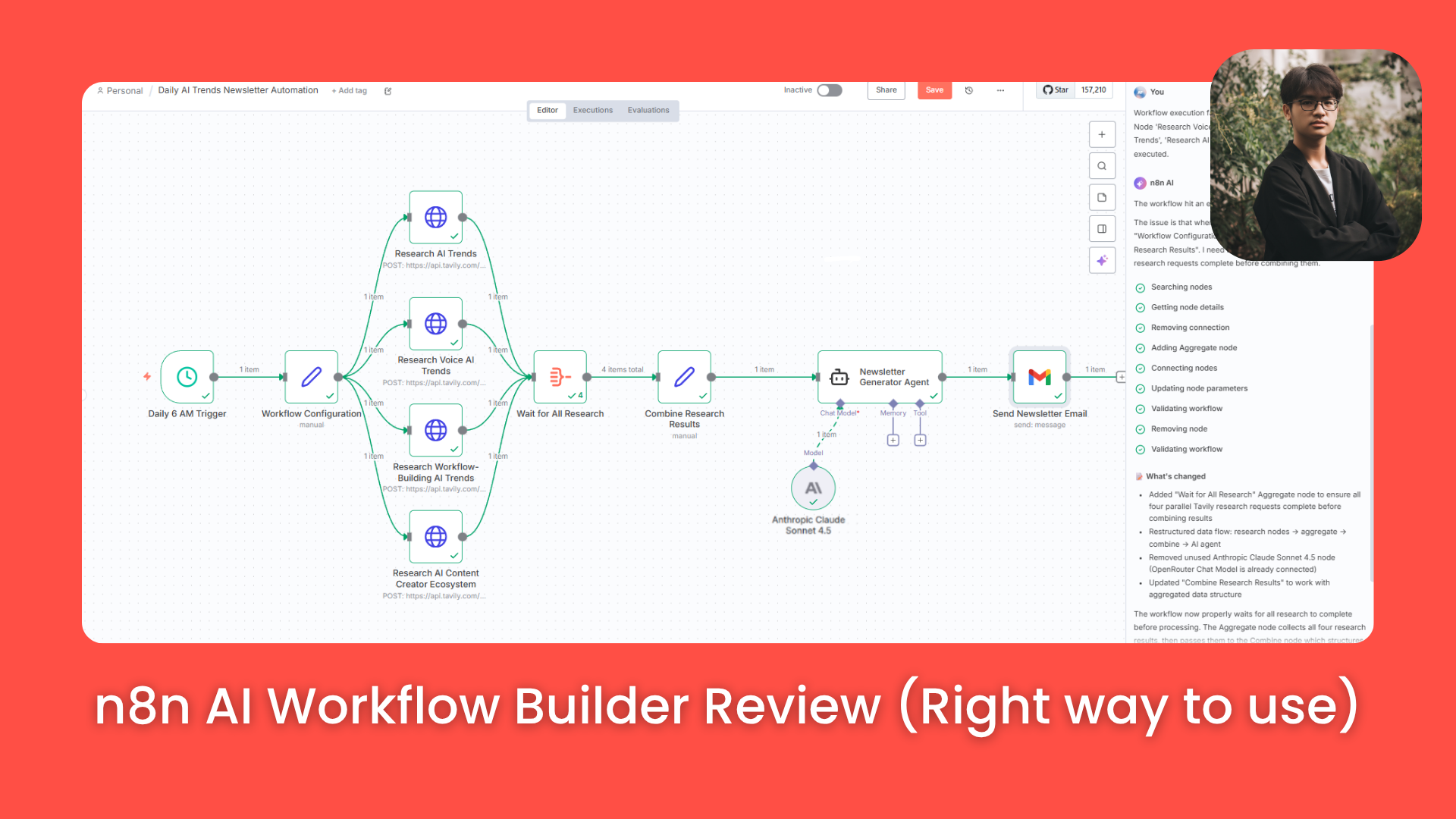
Credit: www.aifire.co
Non-obvious Insights Most Beginners Miss
Here are two truths most guides skip:
- Data mapping is everything: If your data doesn’t match what the next node expects, your automation fails. Always check formats.
- Scheduling workflows: It’s not just “run once”—N8N lets you schedule, repeat, or trigger on complex rules. Use this for daily reports, reminders, or batch jobs.
Actionable Takeaways For Solo Founders
- Start simple: One workflow, one result. Don’t overbuild.
- Use templates: N8N has ready-made flows for common tasks.
- Invest in learning: 2–7 days upfront saves dozens of hours later.
- Choose hosting wisely: VPS is best for cost and flexibility.
If you’re serious about automating your business, N8N is worth the learning curve. But don’t expect instant results—plan for a week of setup and experimentation.

Credit: www.samirsaci.com
Frequently Asked Questions
What Is N8n And How Does It Work?
N8N is a visual automation tool that connects apps and services so you can build workflows without code. You create flows by linking triggers and actions, automating tasks like email, data sync, or notifications.
Is N8n Easier Than Zapier For Beginners?
Zapier is easier for absolute beginners, but N8N offers more customization and lower long-term costs. If you want simple automations fast, Zapier wins; for complex or scalable flows, N8N is better.
Do I Need To Know Coding To Use N8n?
No coding is required for basic workflows, but learning JavaScript helps unlock advanced features. Most beginners can automate common tasks with drag-and-drop, but scripts add power.
How Much Does It Cost To Run N8n?
Self-hosted N8N costs $6–$12/month on a VPS, while cloud plans start at $20–$50/month. Most solo founders prefer VPS for flexibility and savings.
Where Can I Get Help If I Get Stuck?
The N8N forum, official docs, and community templates are your best resources. For advanced troubleshooting, check N8N’s official site.
If you’re ready to automate smarter, N8N can be your unfair advantage. Just be prepared for a short learning sprint—and the payoff is real.