
If you’re running a business solo, every minute and dollar counts. The right work system can be the difference between scaling up and burning out. Two approaches are battling for your workflow: AI agents and linear workflows. Choose wrong, and you waste precious resources. Choose right, and you unlock compounding productivity. Here’s the real breakdown—ROI, costs, pitfalls, and decision signals—so you can act with confidence, not guesswork.
What’s The Real Difference?
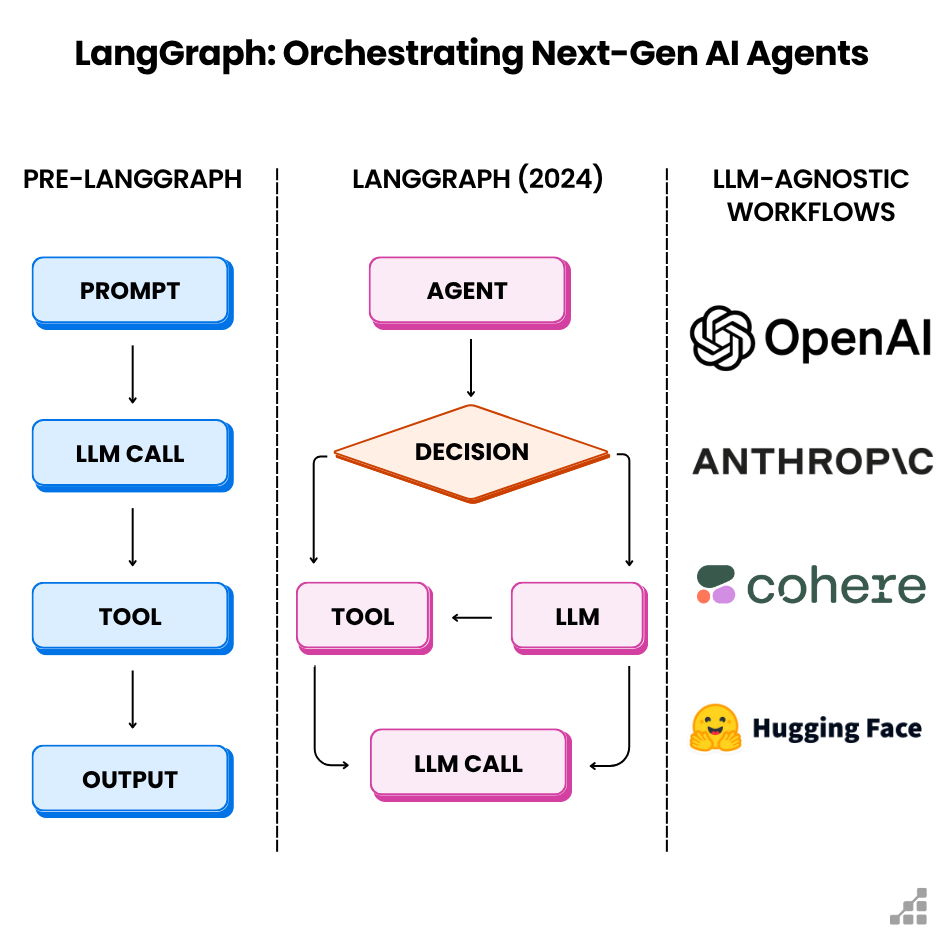
AI agents automate tasks by making decisions and adapting dynamically, while linear workflows follow fixed, step-by-step sequences with little flexibility.
- AI agents: Software “workers” that take in your inputs, analyze context, and autonomously act—sometimes even collaborating with other agents.
- Linear workflows: Classic checklists. Each step is performed in order, usually by a human or simple automation.
This isn’t just theory. Let’s dig into where each wins or fails, with real numbers and examples.
When Ai Agents Outperform
AI agents are changing the game for solo founders who need to do more with less. They don’t just automate—they think, adapt, and optimize, sometimes in real time.
- Dynamic tasks: When every case is different (think customer support, lead qualification).
- High-volume data: Processing hundreds of emails, images, or transactions per day.
- Complex decisions: Prioritizing tasks, personalizing responses, or finding hidden trends.
Example: You run a SaaS startup. Your AI agent handles onboarding emails, adapts its language for each user, books calendar slots, and even flags VIP leads for you. No rigid script—just results.
The Roi Case
A 2023 MIT study found that companies using AI agents for customer queries cut handling time by 41% and saw a 13% boost in customer satisfaction. That’s not just time saved—it’s money and reputation.
When Ai Agents Fall Short
- Upfront setup time: Training, integrations, and error handling take real work.
- Black box risks: Sometimes, the agent does something unexpected and you’re left debugging.
- Cost: Advanced AI agents often charge by usage or seat—costs can spike if not watched.
Credit: www.scalablepath.com
When Linear Workflows Are Better
Sometimes, simple wins. Linear workflows are great for tasks that never change and don’t need decision-making.
- Repetitive processes: Invoicing, basic reporting, scheduled backups.
- Regulatory steps: Compliance routines where every action must be logged and traceable.
- Small-scale operations: When you do the same handful of tasks every week.
Example: You’re processing payroll. The steps never change. A linear workflow ensures nothing is skipped, and every action is logged for audit.
Linear Workflow Strengths
- Predictable: Know exactly what happens, every time.
- Low maintenance: Fewer moving parts, so less can break.
- Cheap: Often built with free or low-cost tools (Zapier, Airtable, Google Sheets).
The Limitation
As soon as exceptions or complex decisions creep in, linear workflows start to break down. You end up jumping in constantly to fix things. That’s a sign you need more intelligence—maybe an AI agent.
Visual Comparison: Ai Agents Vs. Linear Workflows
Here’s a quick reference to show where each system excels:
| Criteria | AI Agents | Linear Workflows |
|---|---|---|
| Setup Time | High (customization required) | Low (drag-and-drop setup) |
| Flexibility | Very high | Low |
| Cost (monthly) | $50–$500+ | $0–$50 |
| Error Handling | Adaptive (self-correcting) | Manual intervention needed |
| Scalability | Excellent for large-scale, varied tasks | Best for small, repetitive tasks |
Solo Founder: How To Choose
Here’s a clear decision framework for picking the right tool for your one-person business.
Use Ai Agents If:
- You handle dynamic, unpredictable tasks.
- You want to scale without hiring staff.
- Your workflow involves lots of data or requires real-time adaptation.
- You need to make smart decisions on the fly (like lead scoring, content personalization).
- You’re comfortable investing time up front to save more later.
Use Linear Workflows If:
- You repeat the exact same process every day or week.
- Your task has no exceptions or custom logic.
- You want the cheapest, fastest route to automation.
- You need easy troubleshooting (no “black box” surprises).
- You’re just getting started with automation.
Don’t Overlook Hybrid Approaches
Some of the best solo operators combine both:
- Use a linear workflow to kick off common processes.
- Trigger an AI agent at the point a smart decision is needed.
Example: A linear Zapier workflow brings in new leads, but an AI agent qualifies and routes them based on intent and value.
Cost Breakdown: Real-world Numbers
Operational costs aren’t just licenses—they’re time, errors, and opportunity.
| Cost Factor | AI Agents | Linear Workflows |
|---|---|---|
| Software Subscription | $50–$500/month (per agent or usage) | $0–$50/month (per workflow) |
| Setup Time | 5–30 hours | 1–3 hours |
| Maintenance | Ongoing (monitoring, retraining) | Minimal (periodic checks) |
| Error Recovery | Automated or AI-assisted | Manual fixes |
| Hidden Costs | Debugging, data labeling | Missed exceptions, skipped steps |
A Real Example
You run a solo e-commerce shop. Handling customer support with AI agents (like Intercom’s chatbot) costs you $99/month but saves 10 hours a week. A linear workflow using canned responses in Gmail is free but requires you to check and reply manually—a hidden cost of your time.
Tech Stack Tips For Solo Operators
Choosing the right stack can make or break your setup. Here’s what you should know:
Ai Agent Platforms
- OpenAI API: Build custom agents (coding required).
- Zapier AI: Connects AI to hundreds of tools, no code.
- LangChain: For advanced users, builds complex agents.
Linear Workflow Tools
- Zapier: Simple drag-and-drop automations.
- IFTTT: Best for personal or small business tasks.
- Make.com: Visual workflows for more flexibility.
Integration Pitfalls
- Data silos: Don’t let your AI agent work in isolation. Make sure it integrates with your CRM, email, and support tools.
- Over-automation: Automate too much, and you risk losing the personal touch that sets solo founders apart.
Pros And Cons At A Glance
Here’s an at-a-glance summary for quick decision-making:
| AI Agents | Linear Workflows | |
|---|---|---|
| Pros |
|
|
| Cons |
|
|

Credit: towardsdatascience.com
Two Non-obvious Insights Most Founders Miss
- Operational drag is the real killer. Many solo operators automate with linear tools but end up firefighting exceptions—wasting time and mental energy. If you’re constantly fixing broken automations, that’s a red flag for switching to AI agents.
- The hybrid sweet spot: The best ROI often comes from combining both systems. Use linear workflows for the predictable 80% and let AI agents handle the complex 20%. This keeps costs low but delivers adaptability where it counts.
Actionable Playbook For Solo Entrepreneurs
- Map your processes: List all routine tasks. Mark which are repetitive (good for linear) and which are complex (candidates for AI).
- Start small: Don’t try to automate everything at once. Test with a single process.
- Measure ROI: Track hours saved, errors reduced, and customer feedback.
- Iterate: If linear automations keep breaking, move that process to an AI agent.
- Keep a human in the loop: Especially for new AI-driven tasks, check outputs regularly.
For deeper technical dives and real case studies, check out resources like the Harvard Business Review.

Credit: www.productcompass.pm
Frequently Asked Questions
What Is An Ai Agent In Business Automation?
An AI agent is a software program that can make decisions and take actions on your behalf, often adapting its behavior based on context or data. Unlike simple scripts, AI agents can learn and improve over time.
Are Linear Workflows Still Relevant With All The New Ai Tools?
Absolutely. Linear workflows are perfect for predictable, repetitive tasks. They’re cheap, easy to set up, and reliable for small-scale operations—especially if your tasks never change.
How Do I Know If My Process Needs An Ai Agent?
If your workflow breaks down when exceptions occur, or if it involves decisions that can’t be hard-coded, it’s a strong sign you’d benefit from an AI agent. Also, if you’re spending too much time fixing automations, consider upgrading.
What’s The Main Risk With Ai Agents For Solo Founders?
The biggest risk is unexpected behavior—AI agents can sometimes act in ways you didn’t intend. This means you need good monitoring and clear fail-safes, especially if customer experience is on the line.
Can I Combine Ai Agents With Linear Workflows?
Yes, and it’s often the smartest move. Use linear workflows for routine steps and trigger AI agents only when complex decisions or custom logic are needed. This keeps costs down while maximizing flexibility.
Every founder’s setup is unique, but with the right mix of tools and a sharp eye on ROI, you can unlock massive leverage—no extra hires needed. Choose wisely, iterate fast, and let your tech work for you, not the other way around.